WhatLaunch.com is a modern, fast, bloat-free and ad-free web app designed to track upcoming global space rocket launches in real-time. The favorites function allows users to keep track of upcoming events and avoid missing any updates by pinning specific launches. Countdowns and schedules are displayed in the user’s time zone, eliminating the need for mental math.
Try it out!

Click here to launch the website and install the web app!
WhatLaunch.com
The competition and what makes my app better
The most famous space launch tracker websites, such as Next Spaceflight and Rocket Launch Live, already provide the kind of service and information that I was looking for, but I was not fully satisfied with them.
In my opinion, these websites fall short in the way they display information.
Besides personal preferences regarding website appearance, a feature was missing: the option to pin favorites.
I wanted to be able to visit the website from my laptop or phone, select a launch to follow, then keep track of its status and time changes as the launch date and time approached.
- Are you interested in that particular rocket company’s next launch and want to check in every now and then to see the status at a glance?
Before WhatLaunch.com, that wasn’t possible.
There’s no need to register, accept cookies, or navigate ads. Simply access the website, which will remember your favorites and translate all times into your device’s time zone. No account or additional steps are necessary.
My goal for this project was to create a fast, bloat-free, ad-free, and cookie-free rocket launch tracker. The essential features I wanted were the ability for users to select their favorite launches and automatic detection of their time zone. I also wanted a sleek, easy-to-read dashboard with the ability to choose how many flights to display and use filters for a more in-depth search. In addition to the website, the progressive web app can be installed through the browser.
The tech stack I used
In terms of front end, I’ve wanted for a while to look into a more modern web development setup using React, as opposed to what I’m doing for my personal website, where I’m using the static website generator Jekyll. I wrote about the architecture of matsan.it here.
In addition to React, I used Vite for its speed and Tailwind for the CSS. I was impressed by this trio. As someone who is not a software engineer, I am learning to use these tools as I go, and I now understand why this setup is so highly regarded in the community.
For the icons, I used Lucide React.
The backend is powered by Cloudflare Workers. I’m also using the Cloudflare KV (Key-Value) Vault as a database to cache data from my API, which I get from The Space Devs on the free tier. Cloudflare also hosts the domain whatlaunch.com, and it makes combining all of these tools incredibly easy. I’ve implemented observability and security features on Cloudflare as well, leveraging the advantages of this integrated infrastructure.
The core features
These are some of the core features that I implemented. More to come!
-
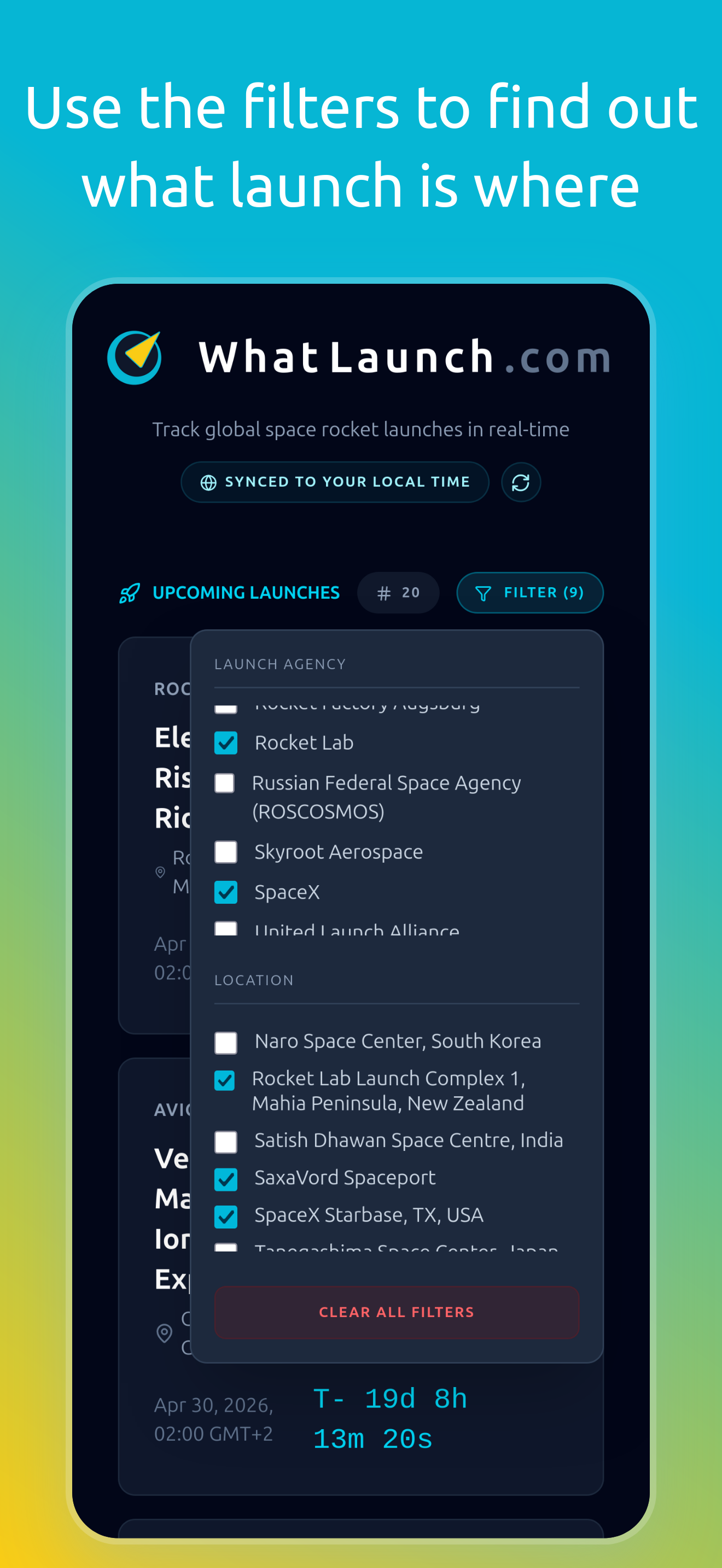
Multi-filtering system: I wanted users to be able to filter displayed launches by launch agency (such as SpaceX, Rocket Lab, etc.) and by launch location. The first version of this feature could only filter one attribute at a time, which made it impractical. Now, with an array-based filtering system, users can select any combination of agencies and locations, allowing them to find what they’re looking for and create custom data views.
-
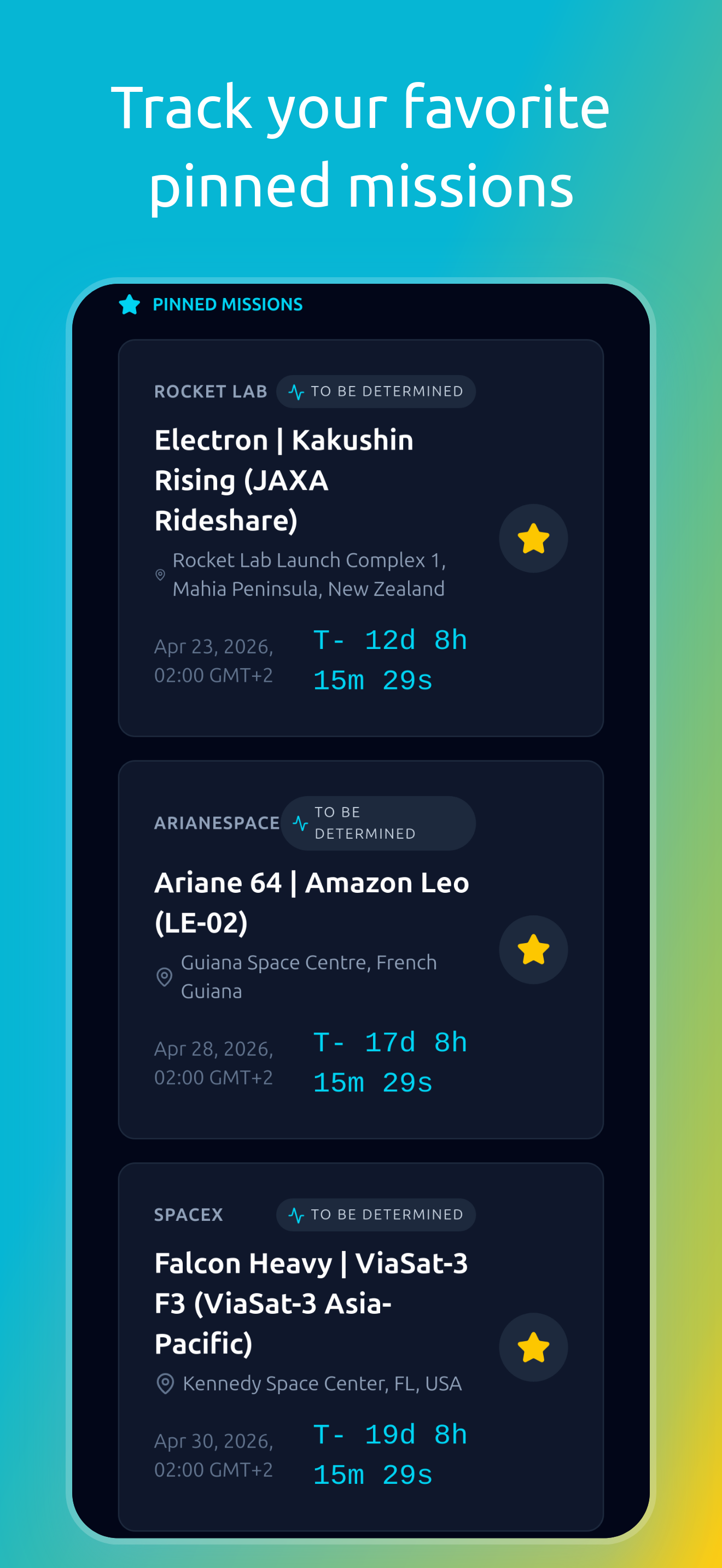
Favorites and Local State Persistence: I wanted users to be able to pin their favorite launches and have them displayed at the top for every session. At the same time, I didn’t want to save user data or require logins, so I used the browser’s
localStoragefeature. Even if the user returns days later, the pinned missions are shown so that they can easily keep track of them. -
Time Zone Detection: Another essential feature for me to add was automatic time zone detection so that all countdowns and schedules are synchronized to the user’s time. I used the native JavaScript
Intl.DateTimeFormatto allow the app to passively receive information about the time zone and reformat the UTC time received from the API. I also added an interactive toggle to the UI to show users that this feature is active. -
Progressive Web App (PWA): To maximize ease of use, I configured a
manifest.jsonfile to make the website downloadable as an app. Users can now install the app natively on iOS and Android through a browser like Chrome, Edge, or Safari.
Where the data comes from and how it’s served
One of the best data sources for everything related to space launches and events is The Space Devs. This website offers APIs related to events and launches. The one I use for this project is called “Launch Library”, and on the free tier a maximum of 15 data requests per hour are available.
When I built the website for myself, the front end fetched data directly from the API with every refresh. This meant that, every time I made more than 15 requests per hour, I hit the limit and the website broke. Below is a diagram of this architecture.
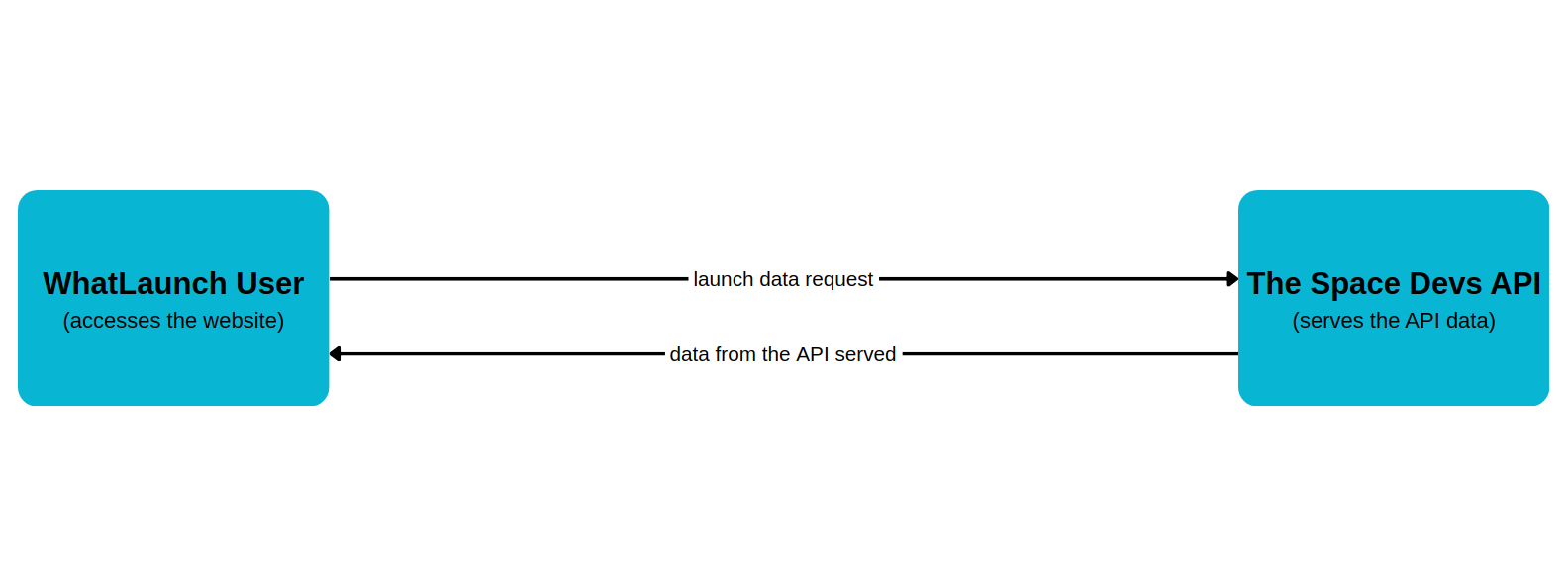
The inefficient architecture, where every website request was directly resulting in an API request
I quickly realized that this was not an efficient way of doing things, so I looked for another solution. I ended up using Cloudflare’s infrastructure to create something called a Serverless Reverse Proxy with an Edge Cache. The diagram below shows how my website works now.
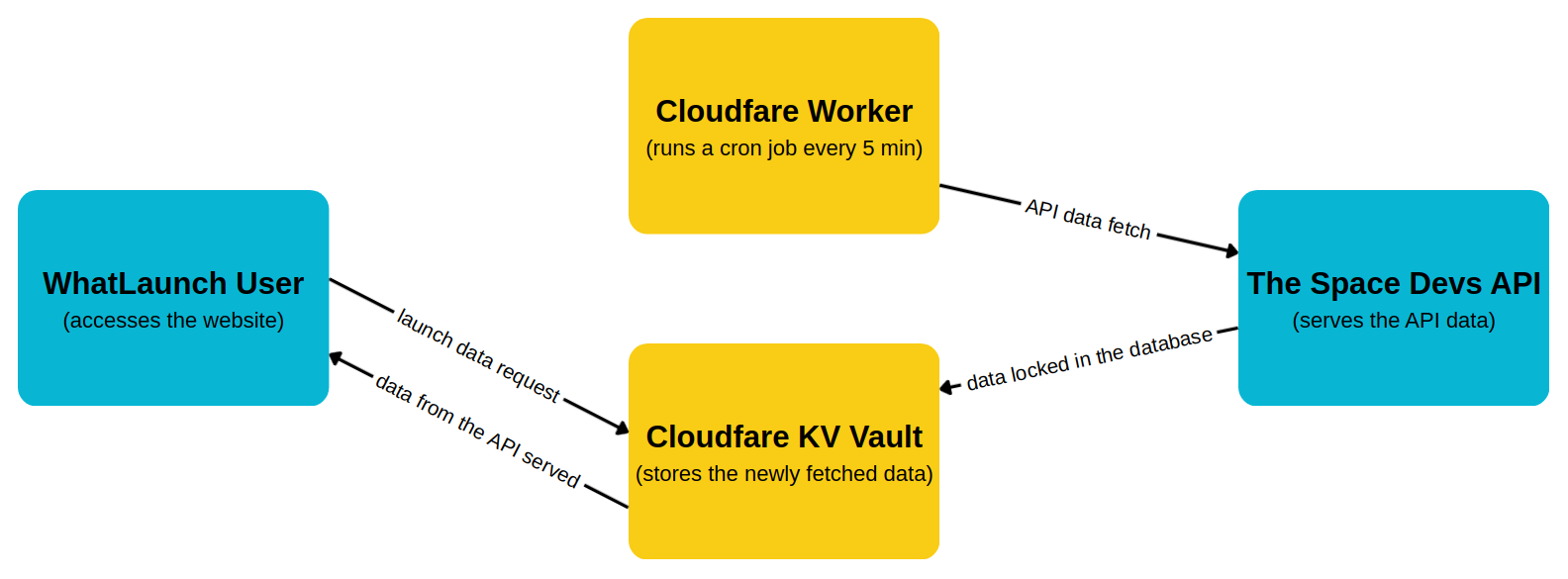
The more efficient architecture using the caching solution: a Serverless Reverse Proxy with an Edge Cache
Now, instead of WhatLaunch users going directly to the API, I implemented a Cloudflare Worker that runs a cron job (a scheduled event) every five minutes.
This worker fetches data in the background and stores it in Cloudflare’s globally distributed KV Vault.
When a WhatLaunch user opens the app or refreshes the page, the React app fetches the most up-to-date data directly from the KV Vault.
This allows the app to handle millions of simultaneous users without having to send requests to the API, thus bypassing the rate limit problem.
Security measures
I implement some security measures to secure the app against attacks and implement telemetry to ensure everything works properly. Some of these measures are:
- CORS Shielding: The worker backend rejects data requests from unauthorized domains.
- Web App Firewall: I configured Cloudflare rules to intercept and block malicious botnets before they reach my server.
- Cloudflare Observability: I activated this feature to monitor the success rate of the backend cron job and track API status codes in real time.
Frontend and app appearance
The focus of this project was, for me, the front end and the appearance of the web app.
I’m very satisfied with the result and the dashboard interface.
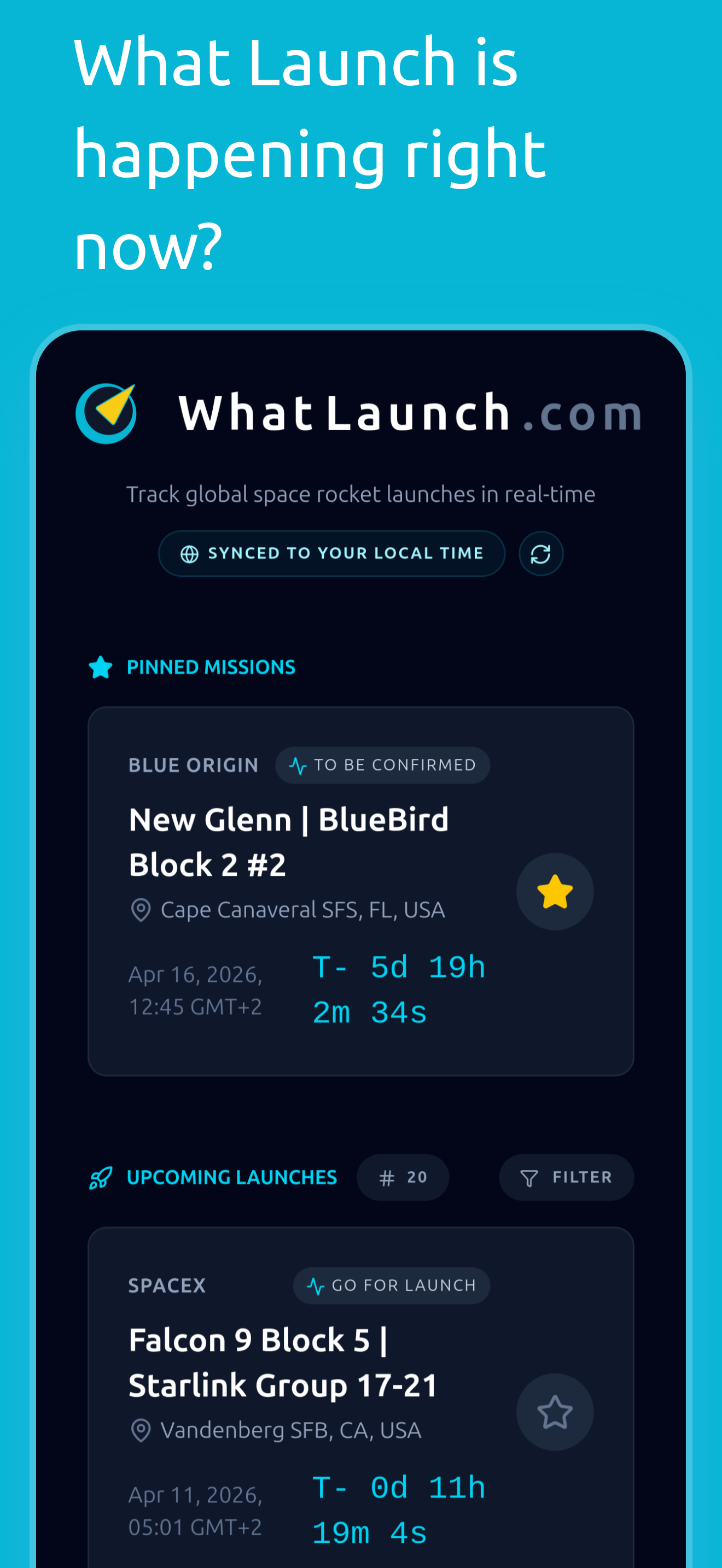
I like the way the pinned section displays the favorites and how the different launches with their status, location, and countdowns are displayed.
I love choosing color palettes, trying out different space setups, and inserting nice cosmetic easter eggs.
Screenshots
Conclusion and link
Click here to launch the website and install the web app!
WhatLaunch.com
Let me know how the app works for you!
If you have any questions, suggestions or feature requests, don’t hesitate to contact me!
Ciao!